Overblast gift cards
Give someone
every AI model.
AI credits for every model: chat, pictures, video, speech and music, through one key. From €100, every card is worth 1.5x.
 OverblastGift card
No account needed to buy Valid for 12 months Euros or US dollars




How it works
Buy in a minute, redeem in two
The buyer needs an email address and a card. The person who redeems it signs in to Overblast and picks the workspace that gets the credits.
How to buy
- 1
Choose the amount
Any whole amount from €1 to €500, in euros or US dollars. From €100, the card is worth 1.5 times as much: €100 buys €150 of credits.
- 2
Say who it is for
Optional: their name for the card, their email if you want us to send it, and a message. Leave them out to send the code yourself.
- 3
Pay, and get the code
Stripe takes the payment. The next page shows the code, XXXX-XXXX-XXXX-XXXX, with a copy button, the card's value and its last day. Your receipt email carries the code too. Prices exclude VAT, added at checkout where applicable. The card's value is never reduced.
How to redeem
- 1
Sign in, or create an account
Open the console and sign in, or create an Overblast account with your email or Google.
- 2
Open the redeem page
Follow the link in the gift email, which carries the code, or open console.overblast.app/redeem and paste it.
- 3
Pick the workspace
Choose which of your workspaces gets the credits. Redeem a card once, into one workspace.
- 4
The credits land
They are AI credits in that workspace at once, for the AI gateway and everything else that uses credits. Redeeming is in the console, not in the phone app.
Use your credits
One key, then the tools you already use
The credits pay for the AI gateway: one OpenAI- and Anthropic-compatible key for 259 chat models, plus pictures, video, speech and music. Make the key once, then point your tool at Overblast.
Make an API key
- In the console, open Keys & devices and press New key.
- Name it, and under Scope preset choose AI gateway: models, pictures, video, speech and files on the AI gateway. It ticks
ai:llm,ai:image,ai:video,ai:audioandai:files, and nothing of the rest of your workspace. - Copy the key, which starts
ob_live_. It is shown once. - Put it in
OVERBLAST_API_KEY, which the SDKs, Codex and the curl calls below read. Claude Code, the Claude desktop app and Cursor take the key itself.
export OVERBLAST_API_KEY=ob_live_…
The two base URLs
OpenAI-style (the OpenAI SDKs, Cursor, Codex, curl): https://ai.overblast.app/v1
Anthropic-style (Claude Code, the Claude desktop app, the Anthropic SDK): https://ai.overblast.app. The client adds /v1/messages itself.
Pin a region with /eu/v1 or /us/v1, or /eu and /us on the Anthropic-style base. Regions and privacy
The most common setups
# ~/.claude/settings.json, with your key itself (no "Bearer" before it)
{
  "env": {
    "ANTHROPIC_BASE_URL": "https://ai.overblast.app",
    "ANTHROPIC_AUTH_TOKEN": "ob_live_…",
    "ANTHROPIC_API_KEY": "",
    "ANTHROPIC_MODEL": "anthropic/claude-sonnet-5.5+image",
    "ANTHROPIC_DEFAULT_HAIKU_MODEL": "anthropic/claude-haiku-4.5",
    "CLAUDE_CODE_ENABLE_GATEWAY_MODEL_DISCOVERY": "1",
    "CLAUDE_CODE_DISABLE_UNKNOWN_MODEL_WINDOW_ENFORCEMENT": "1"
  }
}
# Claude Code adds /v1/messages to the base URL itself.
# ANTHROPIC_API_KEY stays an empty string, so no other key is sent.
# +image lets the model draw pictures too; drop it for plain text.
# Then run /logout in claude and start it again. /status shows
# the base URL and an Auth token line.
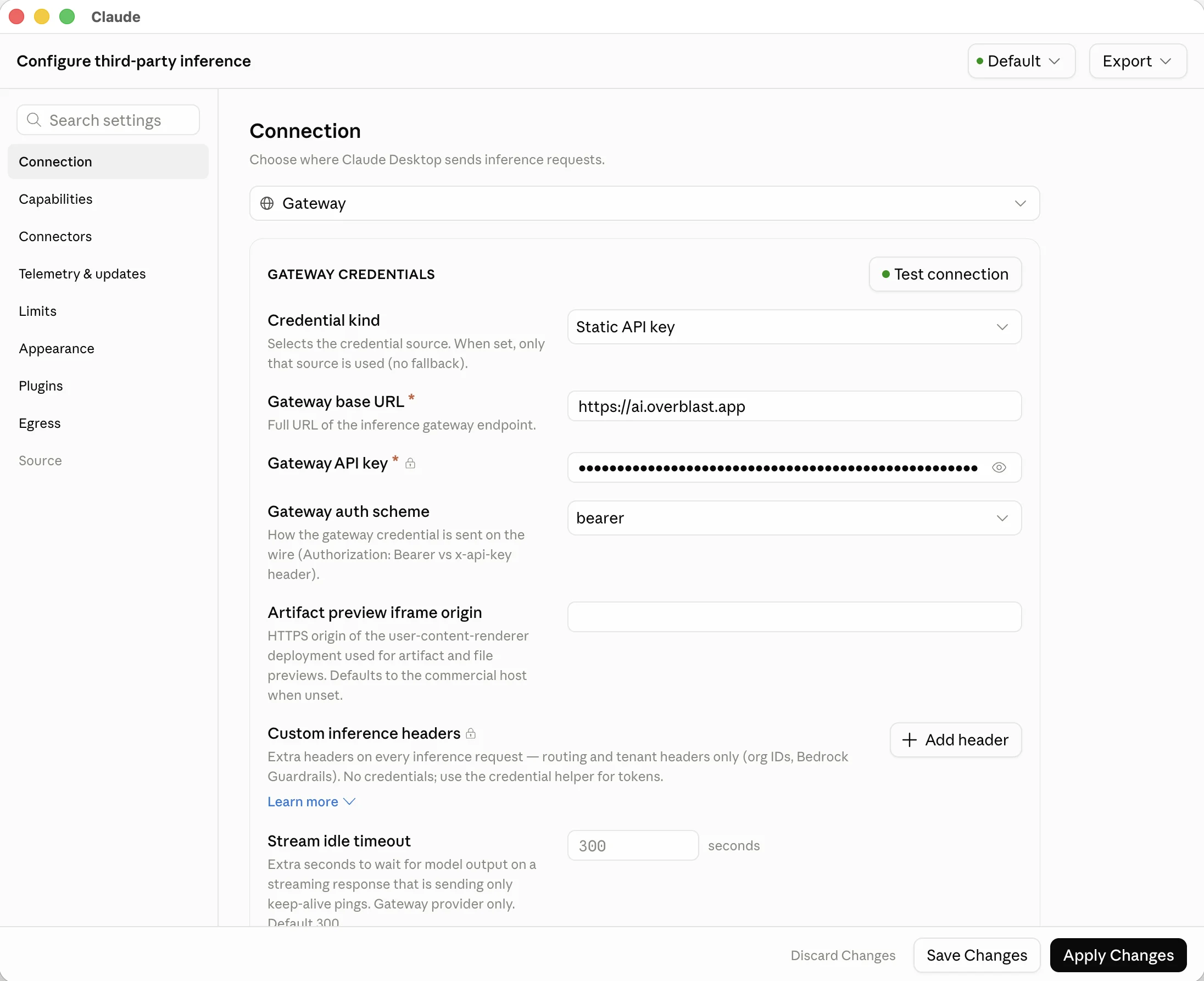
# The Claude desktop app
# 1. Help → Troubleshooting → Enable Developer Mode.
#    The app restarts and shows a Developer menu.
# 2. Developer → Configure Third-Party Inference…
# 3. Under Connection, set Inference provider to Gateway, then:
Gateway base URL:     https://ai.overblast.app
Gateway API key:      ob_live_…
Credential kind:      Static API key
Gateway auth scheme:  Bearer
# No /v1 on the base URL: the app adds /v1/messages itself.
# Then press Apply Changes.
# ~/.codex/config.toml
# Codex speaks the Responses format, so give it a plain model id:
# superpowers (+image and the rest) run on chat completions and Messages.
[model_providers.overblast]
name = "Overblast"
base_url = "https://ai.overblast.app/v1"
env_key = "OVERBLAST_API_KEY"
wire_api = "responses"

# then, for one run
codex -c model_provider=overblast -c model=openai/gpt-6.1-sol
# Cursor Settings, Models: switch on the base URL override,
# paste the key, and add the model by its id
OpenAI API Key:           ob_live_…
Override OpenAI Base URL: https://ai.overblast.app/v1
Add model:                anthropic/claude-sonnet-5.5
# pip install openai
import os
from openai import OpenAI

client = OpenAI(
    base_url="https://ai.overblast.app/v1",
    api_key=os.environ["OVERBLAST_API_KEY"],
)
reply = client.chat.completions.create(
    model="openai/gpt-6.1-sol",
    messages=[{"role": "user", "content": "Say hello in Estonian"}],
)
print(reply.choices[0].message.content)
// npm install openai
import OpenAI from 'openai';

const client = new OpenAI({
  baseURL: 'https://ai.overblast.app/v1',
  apiKey: process.env.OVERBLAST_API_KEY,
});
const reply = await client.chat.completions.create({
  model: 'openai/gpt-6.1-sol',
  messages: [{ role: 'user', content: 'Say hello in Estonian' }],
});
console.log(reply.choices[0].message.content);
curl https://ai.overblast.app/v1/chat/completions \
  -H "Authorization: Bearer $OVERBLAST_API_KEY" \
  -H "Content-Type: application/json" \
  -d '{
    "model": "anthropic/claude-sonnet-5.5",
    "messages": [{"role": "user", "content": "Say hello in Estonian"}]
  }'
 Full size
LLM+
Add a + and the model makes media
Add a part to any model id and the gateway gives that model the tools for it, runs them, and returns the pictures, clips and voice-overs in the same reply. Your own tools stay in the request.
| Add | The model can | The key needs |
|---|---|---|
+image | Make, edit and upscale pictures | Make pictures |
+video | Make, edit and upscale short clips | Make video |
+avatar | Make a portrait speak a script | Make video |
+audio | Read text aloud in a natural voice | Speech, music, sound effects and transcription |
+music | Compose songs and short clips | Speech, music, sound effects and transcription |
+sfx | Make sound effects, or add synced sound to a video | Speech, music, sound effects and transcription |
+files | Write SVG, CSV, JSON, Markdown and HTML files | Upload files |
+media | All of the above, on the model you named | All of the above |
auto/media | All of the above, with our pick of brain | All of the above |
+image
anthropic/claude-sonnet-5.5+image
"Draw a poster for our Friday launch, then make it blue."
+video
openai/gpt-6.1-sol+video
"Make a short clip of waves rolling in at sunrise."
+avatar
anthropic/claude-sonnet-5.5+avatar
"Make this portrait read our welcome script," with the picture attached.
+audio
google/gemini-3.8-flash+audio
"Read this paragraph aloud in a warm, calm voice."
+music
google/gemini-3.8-flash+music
"Compose a short, upbeat jingle for a coffee shop."
+sfx
anthropic/claude-haiku-4.5+sfx
"Make the sound of an old door creaking open."
+files
openai/gpt-6.1-sol+files
"Turn this table into a CSV file I can download."
Chained
x-ai/grok-4.7+x-ai/grok-imagine-image-2.0+alibaba/wan-3.0
Grok 4.7 writes the shot, Grok Imagine draws the frame, Wan 3.0 films it. One call.
auto/media
auto/media
Every part above, with our pick of brain.
You pay for what runs: the brain's tokens at its price, and each picture, clip or voice-over at its model's price, from your AI credits. A part costs nothing until the model uses it. Superpowers work on chat completions and Messages, so in Claude Code, Cursor, the SDKs and curl; Codex's Responses format takes a plain model id.
Let a model act for your business
The same +, for your workspace instead of media: the model acts through your channels, with your approval rules. Give the key the matching permissions when you make it.
+emailsend email, read replies+messagesmessage a contact+postingpublish posts+commentsreply to comments+callsplace calls
Questions
How long is a card valid?
12 months from the day it is bought. The thanks page shows the last day.
How does the bonus work?
From €100 up, a card is worth 1.5 times what it costs: €100 buys €150 of credits, €250 buys €375 and €500 buys €750. Under €100, a card is worth what it costs.
Is there a maximum?
A card costs any whole amount from €1 to €500. The most one card is worth is €750 of credits.
Which currencies?
Euros or US dollars, chosen when you buy. The card is worth its value in that currency.
Is VAT included?
No. Prices exclude VAT, added at checkout where applicable. The card's value is never reduced. A card bought for €100 is worth €150 of AI credits, with or without VAT on top.
Can I redeem it into any workspace?
Into any workspace you can choose in the console. You pick it on the redeem page, after signing in. A code is redeemed once, into one workspace.
Can I get a refund?
A card nobody has redeemed can be refunded on request: write to [email protected] from the address you bought it with, with the code. A redeemed card cannot be refunded.
Do I need an account to buy one?
No. You need an email address and a card for Stripe. The person who redeems it signs in to Overblast, or creates an account, to choose where the credits go.
What can the credits pay for?
Anything in Overblast that uses AI credits: the AI gateway (every chat model, plus pictures, video, speech and music), and the agent's replies, calls and the media you make in a workspace. Each call costs its model's listed price on the models page.
Every model, wrapped
From €100, a card is worth one and a half times what it costs, up to €750 of AI credits.